Starting with Unraid 6.12.8 in February 2024, official support for ntfy.sh notifications was added to the Unraid web UI. The problem is that the integration only supports a single topic for all notifications and only allows configuring the notification title and message body. Expecting full customization through the UI would probably be unrealistic anyway.
I use three ntfy channels for notifications: critical, alert, and info. This works much better for me than alternatives such as having separate channels per device. My approach is based on how I need to react to a notification rather than where it comes from.
I try to classify notifications based on the reaction they require, not where they come from. It reduces cognitive load and keeps the notification setup simple.
Here are my three topics:
- Critical - Immediate action required
- Alert - Should be reviewed and will likely require some action later
- Info - Low priority, safe to ignore
A few examples:
- Tailscale goes down on my router. I receive a critical notification because none of my services will be reachable anymore — all traffic from my VPS to the Unraid server goes through Tailscale.
- Security updates become available for Ubuntu, Debian, or another OS running on one of my VPS instances. In this case I receive an alert notification. It is something I should address, but there is usually no need to react immediately.
You can find my OpenWrt repository here as example of same ideology. It contains a script that configures ntfy notifications with a single command.
Unraid only allows configuring a single ntfy topic for all notifications. That does not fit my approach very well, although notification priority can still be included in the message body. Fortunately, it turns out that adding more advanced logic is fairly straightforward.
After enabling Settings -> Notification Settings -> ntfy.sh, a shell script is created at /boot/config/plugins/dynamix/notifications/agents/ntfy.sh.sh
By default (with some values configured through the UI), it looks like this:
#!/bin/bash
############
SERVER_URL="https://ntfy.sh"
NTFY_TOKEN=" "
TOPIC="my-info-topic-xxx"
TITLE="$EVENT\n$SUBJECT"
MESSAGE="$TIMESTAMP\n$DESCRIPTION"

############
MESSAGE=$(echo -e "$MESSAGE")
case "$IMPORTANCE" in
'normal' )
PRIORITY="default"
;;
'warning' )
PRIORITY="high"
;;
'alert' )
PRIORITY="urgent"
;;
esac
# Remove any trailing slash
SERVER_URL=${SERVER_URL%/}
curl \
-H "Priority: $PRIORITY" \
-H "Icon: https://raw.githubusercontent.com/unraid/webgui/master/emhttp/plugins/dynamix.vm.manager/templates/images/unraid.png" \
-H "Authorization: Bearer $NTFY_TOKEN" \
-H "Title: $TITLE" \
-d "$MESSAGE" \
$SERVER_URL/$TOPIC
The implementation is fairly simple. In my case, I only needed to change how TOPIC is assigned based on notification priority. I moved the topic selection into the existing case statement:
case "$IMPORTANCE" in
'normal' )
PRIORITY="default"
TOPIC="my-info-topic-xxx"
;;
The final script looks like this:
#!/bin/bash
############
SERVER_URL="https://ntfy.sh"
NTFY_TOKEN=" "
TITLE="$EVENT\n$SUBJECT"
MESSAGE="$TIMESTAMP\n$DESCRIPTION"

############
MESSAGE=$(echo -e "$MESSAGE")
case "$IMPORTANCE" in
'normal' )
PRIORITY="default"
TOPIC="my-info-topic-xxx"
;;
'warning' )
PRIORITY="high"
TOPIC="my-alarm-topic-xxx"
;;
'alert' )
PRIORITY="urgent"
TOPIC="my-critical-topic-xxx"
;;
esac
# Remove any trailing slash
SERVER_URL=${SERVER_URL%/}
curl \
-H "Priority: $PRIORITY" \
-H "Icon: https://raw.githubusercontent.com/unraid/webgui/master/emhttp/plugins/dynamix.vm.manager/templates/images/unraid.png" \
-H "Authorization: Bearer $NTFY_TOKEN" \
-H "Title: $TITLE" \
-d "$MESSAGE" \
$SERVER_URL/$TOPIC
One small detail - if you are using the public ntfy.sh server without authentication,
NTFY_TOKEN=" "must contain a single space. This is not very obvious. Otherwise, the Unraid UI marks the configuration as invalid.
After modifying the script manually, the UI will show something like this:
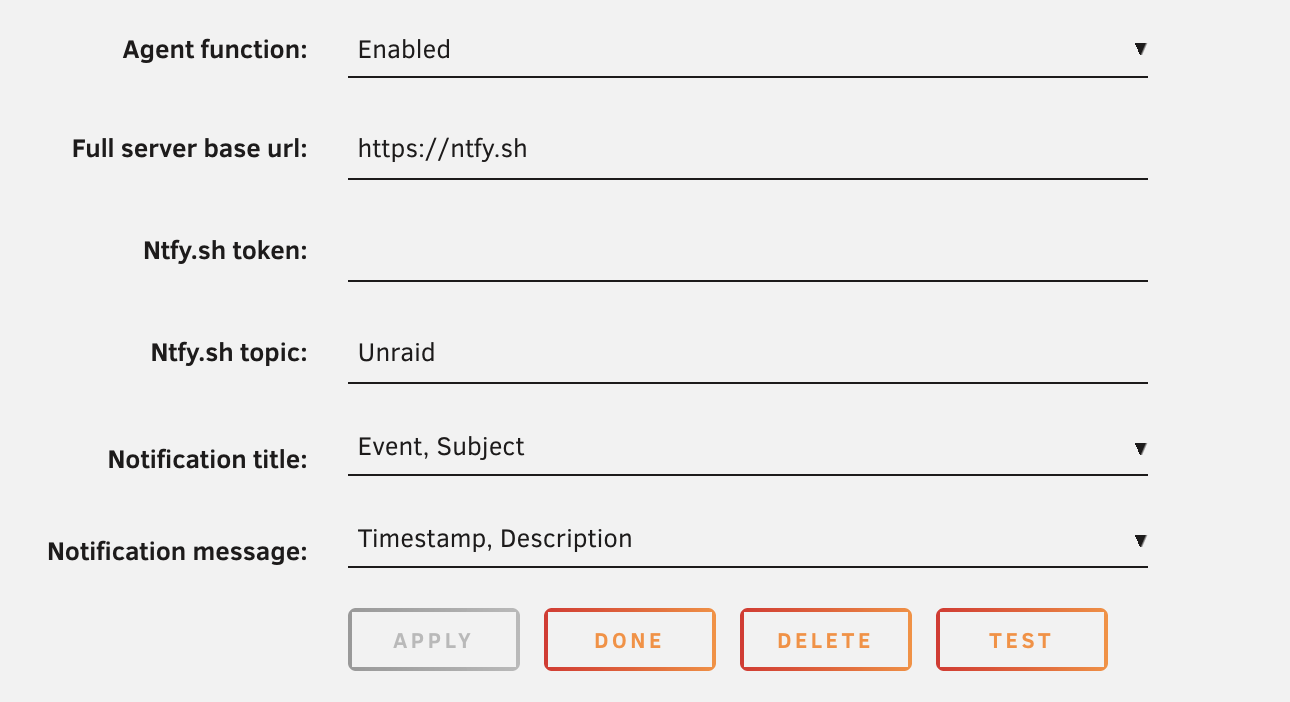
Ntfy.sh topic: Unraid is fine. It appears to be a placeholder value used by the integration when the topic is not configured the way it expects.
After that, Unraid continues to treat the configuration as valid, while notifications are automatically routed to different ntfy topics based on their severity.