I’ve spent the last few months experimenting with game controls. It started with something pretty ordinary: I wanted a more comfortable key layout. I moved WASD around, changed my binds, and even handed movement over to the mouse for a while.
Most of those attempts didn’t get me very far. But one of them made me look at the usual setup differently.
Picture a familiar situation: you’re moving diagonally, holding W and D, while turning the camera with your mouse. Now you need to use an ability bound to E. If you use your index finger for both D and E, you have to let go of rightward movement to use the ability. Your character keeps moving, just not in the direction you wanted.
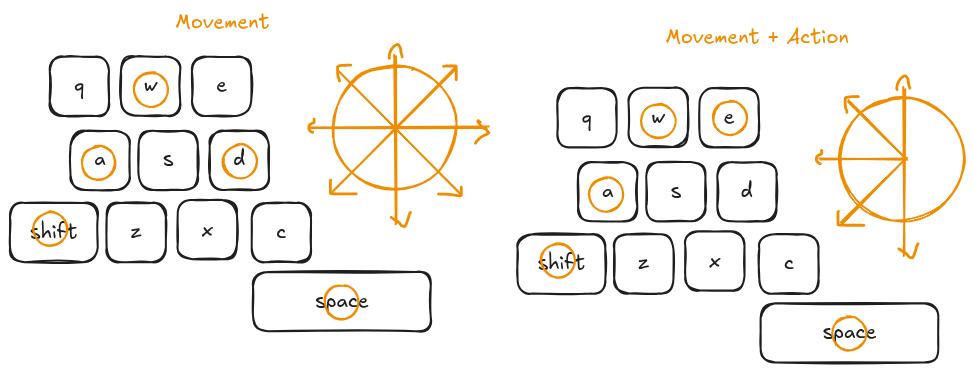
I’d gotten so used to this tradeoff that I barely noticed it. When I looked for more comfortable controls, I mostly thought about devices and keybinds. How the work was split between my fingers came much later.
The problem with WASD isn’t the keys themselves or where they sit. Movement and actions compete for the same fingers.
That’s the idea I wanted to test.
Three things at once
In the games I’m talking about, you’re keeping track of three things at the same time:
- Movement.
- The camera.
- Actions: abilities, items, and interactions.
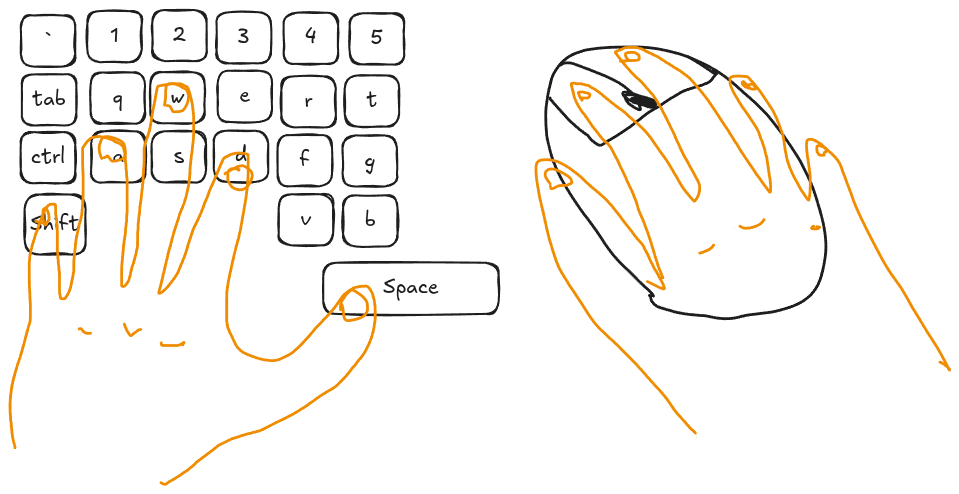 Right hand: camera. Left hand: movement and actions. Already running out of fingers.
Your right hand handles the camera and whatever actions are bound to the mouse buttons. Your left handles movement and a large chunk of everything else.
This setup has been around for so long that it feels obvious. But being familiar doesn’t automatically make it optimal, or even comfortable.
Of course, this doesn’t apply to every game. If there are only a few actions and you rarely need to use them while moving, the standard setup works just fine.
I’m interested in games where you keep running out of fingers: MMORPGs, ARPGs, survival games, and other genres where you need to move, use abilities and items, and interact with the world at the same time.
LEGO Star Wars
I used to love LEGO Star Wars. Looking back, I remember its controls as primitive — in a good way.
As I remember it, my left hand handled movement, my right had a few action keys, and the camera mostly did its own thing. I didn’t have to split my right hand between those keys and a mouse.
If only every game were that easy to control.
WASD turned out to be more interesting than I thought
I was used to WASD and hadn’t really considered alternatives for a long time. Then I put my hands on the keyboard and tried to work out what each finger was actually doing.
On a regular keyboard, my left hand divides the work roughly like this:
- Pinky: mostly Shift and Ctrl.
- Ring finger: A, plus Tab, Q, and 1.
- Middle finger: W, S, Z, X, 2, and 3.
- Index finger: D, E, C, R, F, V, T, G, B, 4, and 5.
- Thumb: Space and Alt.
This isn’t a universal map of ergonomics. It depends on hand size, layout, and habits. But I found the pattern telling: my index finger got the longest list of keys, while my thumb got just two, even if I used them a lot.
So movement uses three fingers. The middle finger even handles two opposite directions: forward and backward.
That’s comfortable enough on its own. The conflict starts when a finger that’s busy with movement is also needed for an action, like D and E in the earlier example. You can move E closer, but that won’t give you a second index finger.
With that in mind, I went back to my experiments.
Trying to solve it
Experiment #1: Moving with the mouse
I moved the movement controls to the mouse: forward on the left button, backward on the right, and left and right on the side buttons.
After a few days of getting used to it, this was surprisingly comfortable. About 4 out of 5. My left hand was completely freed up, and the whole keyboard was available for actions.
But the workload had just moved to my right hand. Constant button presses got in the way of precise camera control, and movement and looking around started competing for the same device. In an MMO where you don’t need to aim constantly, this is a workable option. WoW, for example.
I’d freed up my left hand and overloaded my right. The problem hadn’t gone away. It had just moved.
Experiment #2: Moving WASD
The next idea was simpler: move the controls to ASDF, on the keyboard’s home row. I wanted my hand to sit more comfortably and have more nearby keys within reach for actions.
I tried A and F for left and right, D for forward, and S for backward.
The result was about 2 out of 5. I had to remap almost all my usual binds, and the improvement was small. The keys had moved, but movement and actions were still sharing the same fingers.
Experiment #3: Separating movement and actions
After those two experiments, I realized I’d been trying to solve the wrong problem. I was looking for different keys, when the problem was how the work was split between my fingers.
The idea was to give movement to my thumb and leave the other four fingers on my left hand for actions. My thumb already sits off to the side of WASD. Why not try putting a separate control there?
I own a few ergonomic keyboards, including a ZSA Moonlander. I’ll write about them separately someday, but using them helped push me toward this idea: on those keyboards, the thumbs already handle several frequently used modifiers.
Unlike the first two experiments, this changes which fingers do the work, rather than where the keys are.
Controllers already do something similar
At some point I realized the idea wasn’t all that new. A regular game controller already uses a similar setup.
Your left thumb handles movement, your right handles the camera, and your index fingers can press the shoulder buttons and triggers. But the face buttons also need a thumb. To reach them, you have to let go of a stick.
Back paddles solve part of this problem by giving other fingers something to press. Another option is a claw grip: reaching for the face buttons with your index finger while keeping your thumb on the stick.
It’s a funny situation. The conflict between movement, camera control, and actions is still there; it just shows up somewhere else. I wanted to try combining a stick under my left thumb with keyboard binds and the mouse I was already used to.
From idea to prototype
After all these experiments, giving my thumb control of movement seemed worth a try. So I decided to go beyond changing binds and build a device of my own.
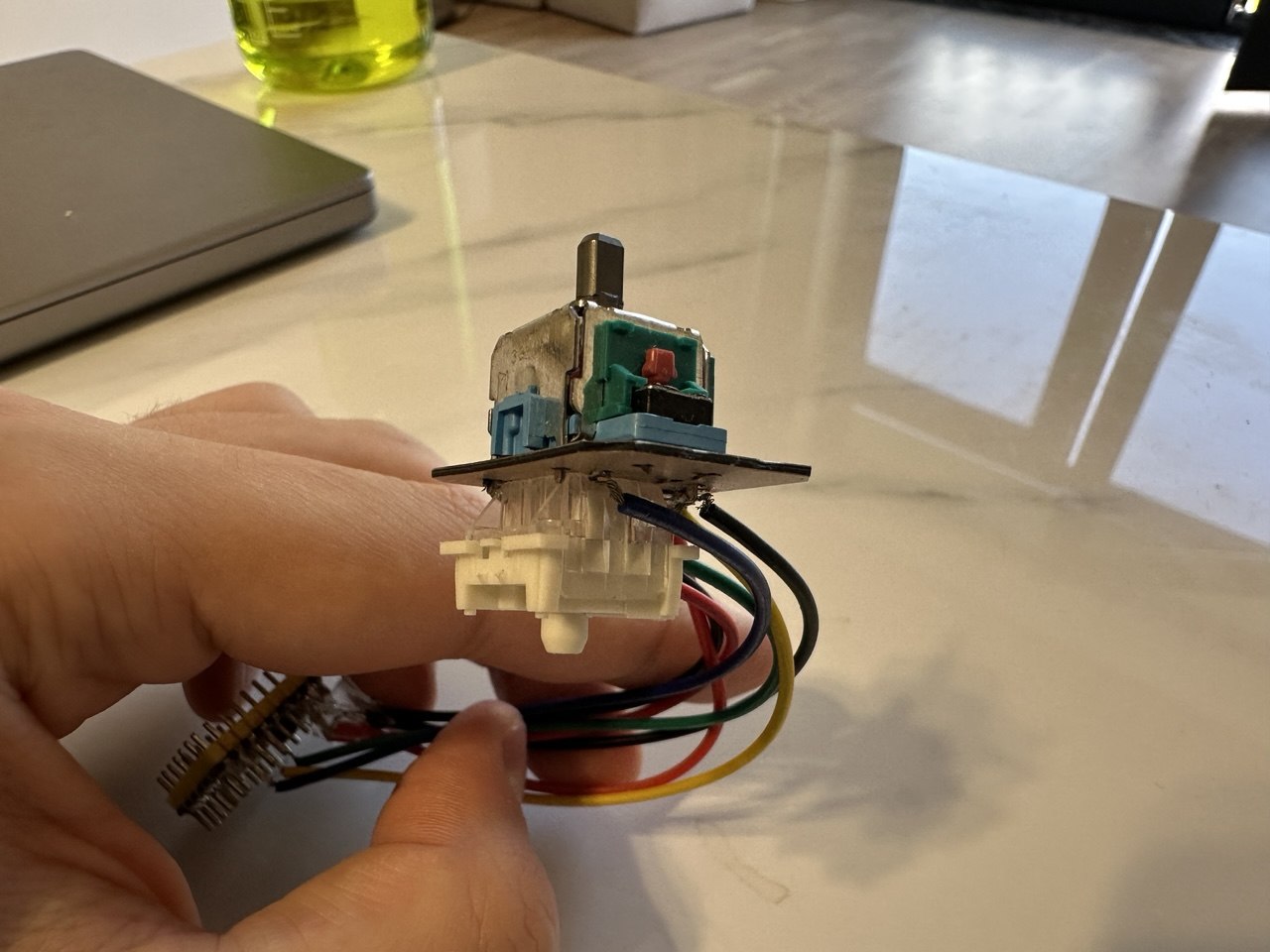
It’s a small USB module with a thumbstick. The computer sees it as a regular keyboard: moving the stick turns into W, A, S, and D. The module sits under my left thumb, leaving the other four fingers on that hand available for actions.
Right hand           → camera
Left thumb           → movement
Other four fingers   → actions
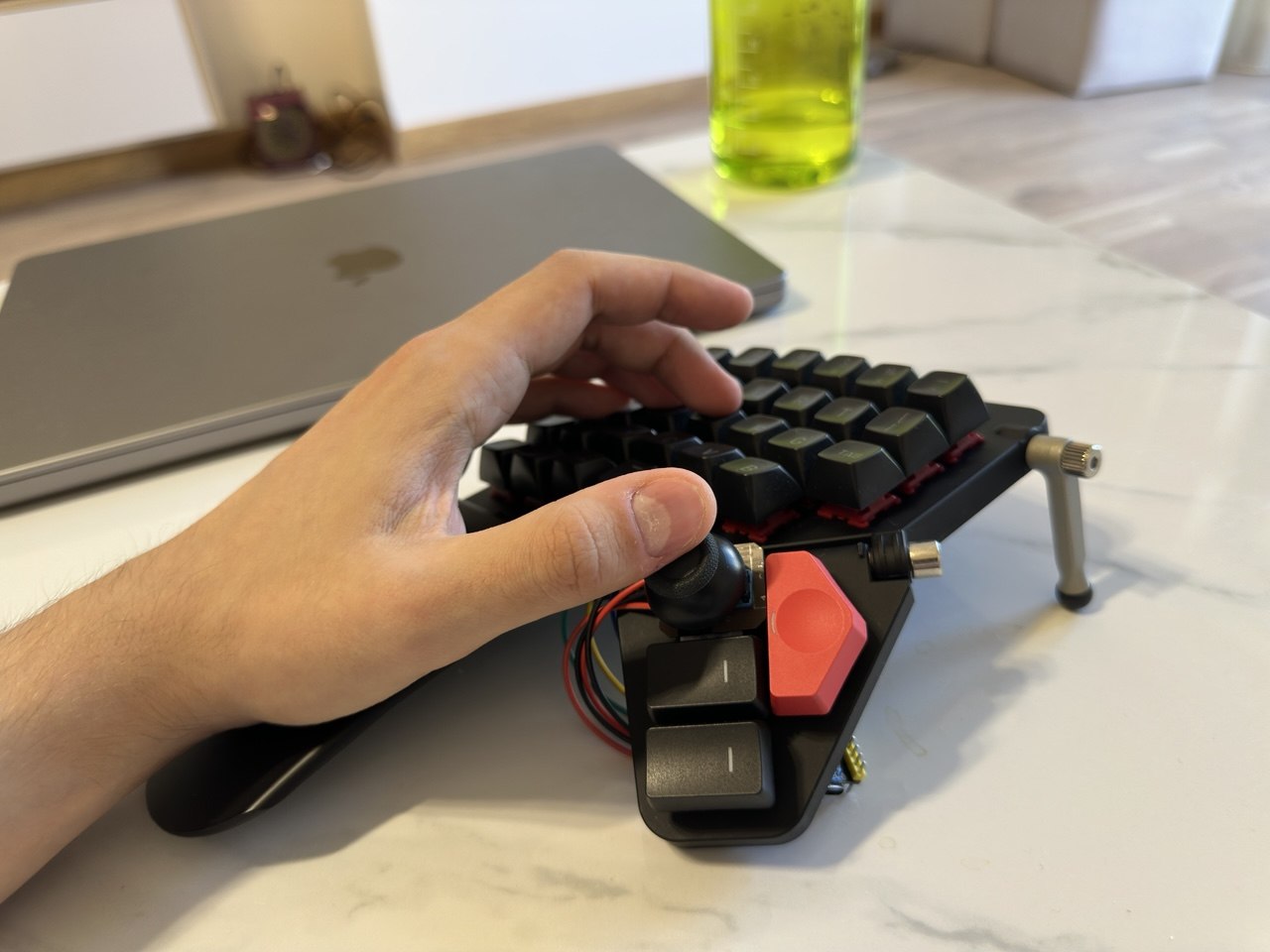
How it works
Inside is a PS5 controller stick and a Waveshare RP2040-Zero board with an RP2040 microcontroller. The stick’s horizontal and vertical axes connect to the board’s analog inputs, and the stick button connects to a separate digital input.
The board runs CircuitPython. At startup, the program takes several readings from the released stick and saves their average as the center. That’s why it’s important to leave the stick alone when plugging it in. This calibration only happens at startup.
From there, it’s pretty simple: the program reads the deflection on each axis and compares it with a threshold. If the stick is tilted far enough, the module holds down the corresponding key. Once it drops back below the threshold, it releases the key. Small movements near the center won’t make your character walk. If both axes pass the threshold, you get a diagonal: W and D together, for example. Clicking the stick is currently mapped to Space.
You can change the keys, threshold, and axis orientation in the program’s settings. To the computer, the module is a standard USB HID keyboard, so it doesn’t need a special driver.
The stick itself is analog, but movement in the game stays digital. You can’t smoothly adjust your speed by tilting it: the game receives the same W, A, S, and D as it would from a keyboard.
How it feels in games
Overall, 5 out of 5. The idea worked exactly as I’d hoped: my thumb handles movement, and the other fingers on my left hand are free for abilities and interactions. I no longer have to choose between keeping a direction held and pressing the bind I need.
But I’d like to improve the stick itself. The current one has too much travel: my thumb has to move a long way from side to side.
I want to try a Nintendo Switch stick. For the next version, I’m looking for something with less travel. I could also experiment with the firmware threshold to make directions register sooner, but that won’t reduce the stick’s physical travel.
Where I ended up
For my use, this setup turned out to be more comfortable: my thumb handles movement, and the other fingers can hit the keys I need. In games where that conflict doesn’t come up, regular WASD is fine for me.
I started by moving keys around and ended up building a separate device. I’m happy with the control scheme. Now I want to refine the module and find a stick that doesn’t make my thumb travel quite so far.